
Your biggest send, from your least-known domain
A pre-launch waitlist sets up an awkward first email. You spend months collecting addresses. Then, on the one morning that matters, you send to all of them at once, from a domain that has barely sent anything before.
Mailbox providers judge mail partly on the sender's history, and a new domain doesn't have one. Google's sender FAQ treats a domain as "new" if it hasn't sent more than 5,000 messages a day to personal Gmail accounts since January 2024, and says enforcement for new domains runs on an accelerated timetable.
None of the rules are hard, and they all cost nothing. But almost none of them can be fixed on launch morning, because DNS records take time to propagate and reputation takes weeks to build. This post covers what Gmail, Yahoo and Outlook.com require, what each requirement means in plain words, and a launch-week order of work.
Who counts as a bulk sender
The three providers draw the line in different places.
- Gmail calls you a bulk sender once you send roughly 5,000 messages or more to personal Gmail accounts in 24 hours (sender guidelines). Its FAQ counts everything sent from the same primary domain, subdomains included, so mail from
news.example.comandexample.comlands in one total. It also says the classification doesn't expire: cross the line once and the bulk rules apply from then on. - Yahoo doesn't publish a number. Its best-practices page applies the bulk requirements to senders of a significant volume.
- Outlook.com applies its requirements to domains sending more than 5,000 messages a day to Microsoft's consumer addresses (outlook.com, hotmail.com, live.com). Microsoft announced them in April 2025, effective May 5, 2025 (Microsoft's announcement).
A 2,000-person waitlist won't cross Gmail's line on its own. Set up for the bulk rules anyway. The work is identical whether you send 500 messages or 50,000, Yahoo gives no number to stay under, and lists grow. The subdomain point is also familiar from launch planning: it's the same counting that makes Product Hunt's cooldown apply per root domain.
The requirements side by side
| Requirement | Gmail, all senders | Gmail, bulk senders | Yahoo, bulk senders | Outlook.com, over 5,000/day |
|---|---|---|---|---|
| SPF | SPF or DKIM | Yes | Yes | Must pass |
| DKIM | SPF or DKIM | Yes | Yes | Must pass |
| DMARC | Not required | Yes; a policy of p=none is enough |
Yes; at least p=none, and it must pass |
Yes; at least p=none |
| From domain aligned with SPF or DKIM | No | Yes | Yes (relaxed alignment is fine) | Yes |
| One-click unsubscribe | No | Yes, for marketing and subscribed mail, plus a visible link | Yes, plus a visible link | Recommended |
| Honour an unsubscribe within | — | 48 hours | 2 days | — |
| Spam-complaint rate | Below 0.3% | Aim below 0.1%, never reach 0.3% | Below 0.3% | No published number |
| Valid forward and reverse DNS | Yes | Yes | Yes | — |
Sources: Google's sender guidelines and FAQ, Yahoo's best practices, and Microsoft's announcement.
Your email provider normally handles reverse DNS and TLS on its own servers. SPF, DKIM, DMARC and alignment are records on your domain. Nobody adds those for you.
The penalties have hardened too. Google's FAQ says enforcement began ramping up in November 2025, and that non-compliant mail can be temporarily or permanently rejected, not just filtered to spam. Microsoft's announcement first said non-compliant mail would go to Junk. It was later updated to say such mail is rejected, with the error 550 5.7.515. A rejected launch email doesn't show up in anyone's spam folder for them to rescue.
SPF, DKIM and DMARC in plain words
Three checks, all published as DNS records on the domain in your From address:
- SPF is a list of the servers allowed to send mail for your domain. When your provider's server hands over a message, the receiver checks that server against your list.
- DKIM is a cryptographic signature on each message. Your provider signs it, and the receiver checks the signature against a public key you publish in DNS. A valid signature means the message wasn't altered and that the signing domain vouched for it.
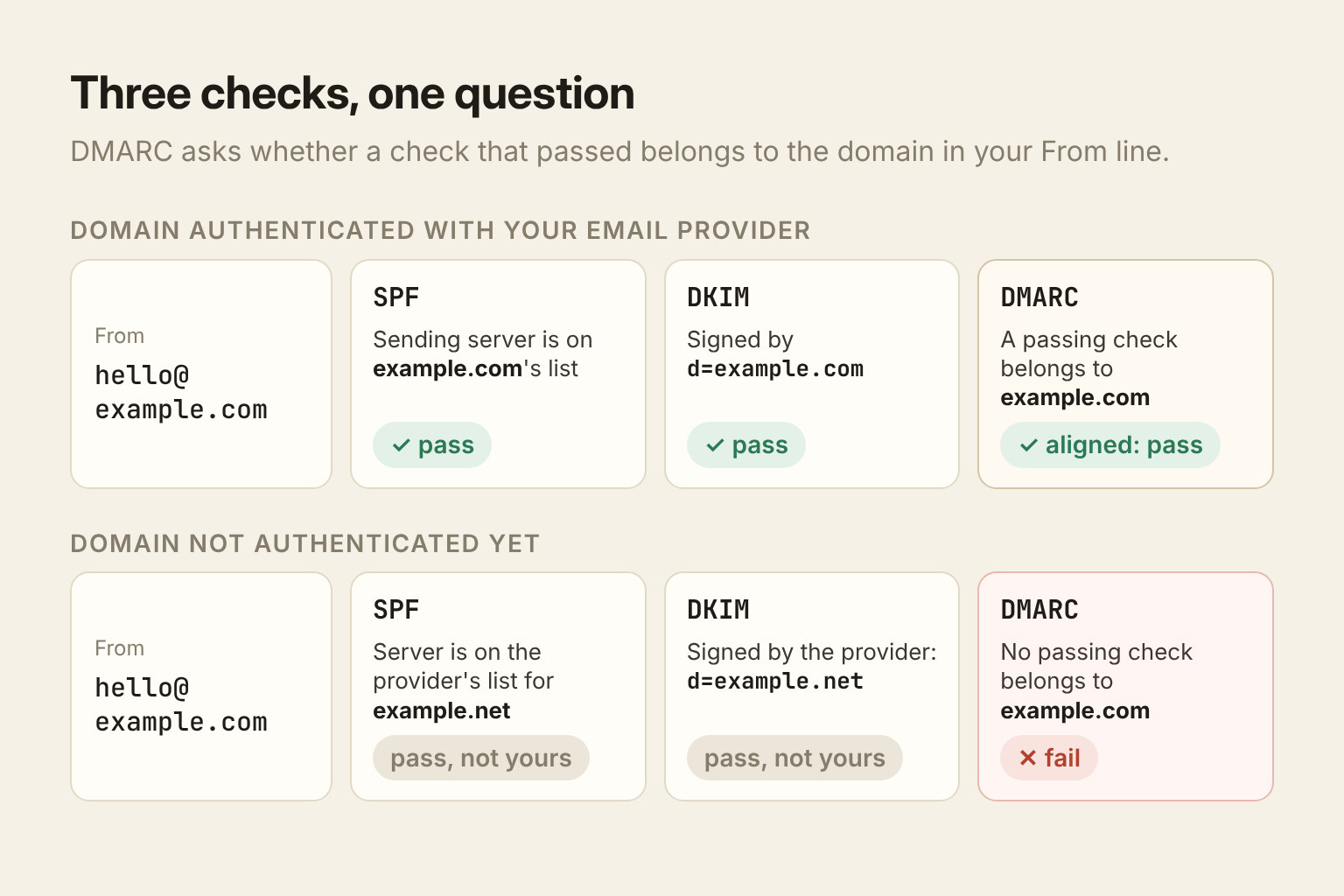
- DMARC ties the two to the address people actually see. It asks whether a check that passed belongs to the same domain as the From line. A DMARC record with
p=nonetells receivers to report failures without acting on them, and that's enough to meet all three providers' rules.
The failure that catches founders is alignment. Say you send from [email protected] through an email provider you've never authenticated with. The provider signs the message with DKIM, but with its own domain, and its own servers pass SPF for its own domain. Both checks pass, yet neither belongs to example.com, so DMARC fails. Each provider's "verify your domain" or "domain authentication" step fixes this. It adds DKIM and SPF records for your domain, so the passing checks become yours.
Check your setup by sending yourself a message at a Gmail address and choosing Show original. Gmail lists SPF, DKIM and DMARC with a pass or fail beside each. You want three passes, with your own domain named in the SPF and DKIM lines.
One-click unsubscribe, and why the link mustn't unsubscribe on its own
The bulk rules ask for two ways out: a visible unsubscribe link in the body, and a one-click option your recipient's mail app can show next to your name.
The one-click version is defined in RFC 8058. The message carries two headers:
List-Unsubscribe, holding an HTTPS address.List-Unsubscribe-Post: List-Unsubscribe=One-Click.
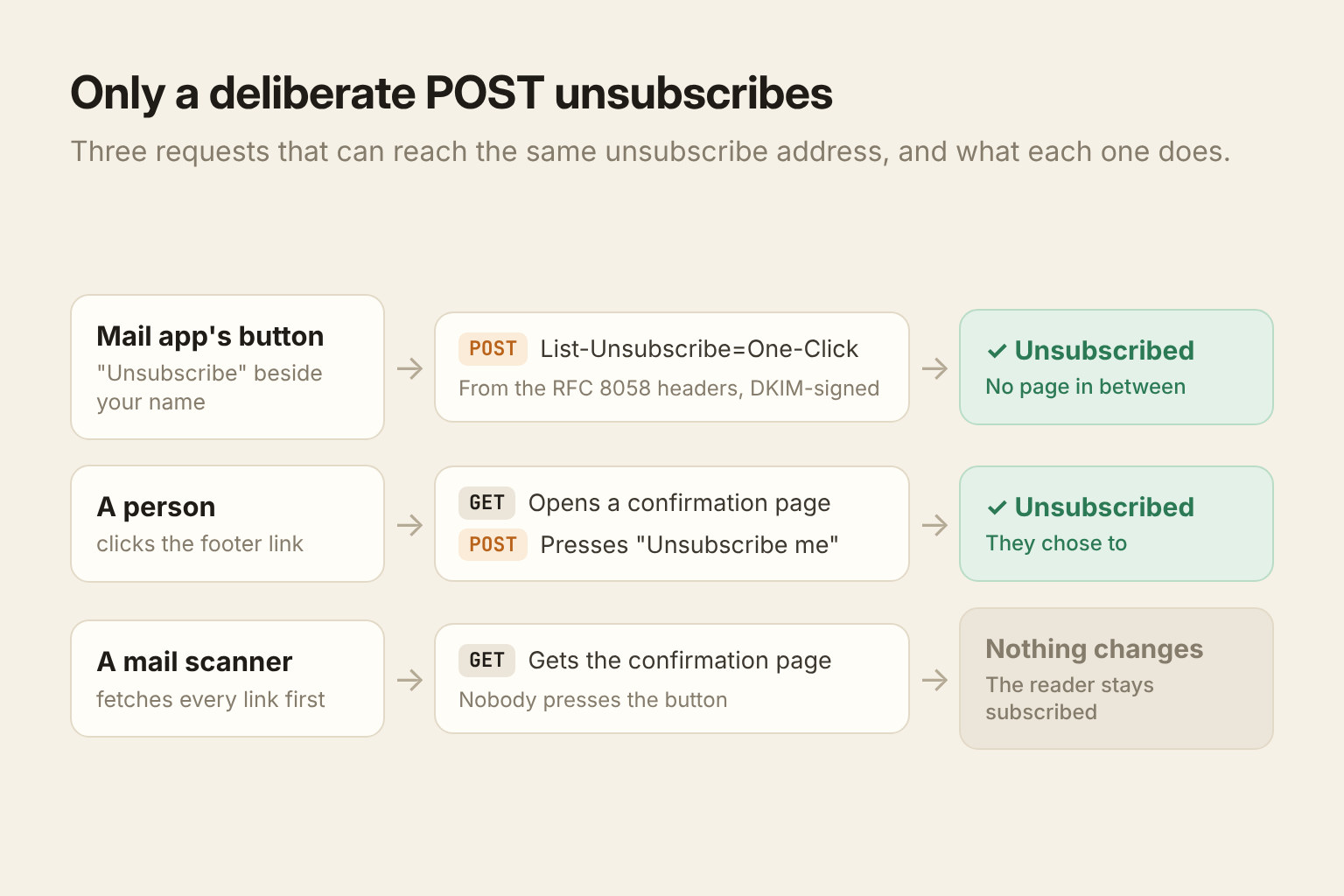
When the recipient presses the button, their mail provider sends an HTTPS POST to that address, and your server unsubscribes them with no page in between. The RFC requires both headers to be covered by a valid DKIM signature, so they can't be added or changed in transit.
The RFC insists on POST for a reason worth knowing: anti-spam software often fetches every link in a message automatically, without anyone clicking. If a plain visit to your unsubscribe address unsubscribed people, a corporate mail scanner would quietly remove readers who never saw the email.
The visible footer link has the same problem, because scanners fetch body links too. So the footer link should open a page with a button, and the button does the unsubscribing.
Then there's the clock. Gmail wants unsubscribes honoured within 48 hours, and Yahoo within 2 days. In the US, the FTC's CAN-SPAM compliance guide allows 10 business days. That's the legal limit, but the mailbox providers' deadline is shorter, so theirs is the one to work to. CAN-SPAM also requires your physical postal address in every commercial email, and honest From lines and subject lines. Each email that breaks the law can cost more than $50,000.
The spam rate is the number you're judged on
Google asks bulk senders to keep the complaint rate it reports below 0.10% and never to reach 0.30% (sender guidelines). Yahoo's ceiling is 0.3%.
At launch scale those percentages are small numbers of people. On a 3,000-person send, 0.3% is nine people pressing "Report spam". 0.1% is three.
Most complaints on a launch email don't come from people who object to it. They come from people who don't remember signing up, and a waitlist that has been open for months is full of them. So the first lines of the launch email should do some reminding:
- Say where and when they joined: "You joined the Example waitlist in March."
- Use the name they'll recognise in the From line. If the waitlist page said "Sam from Example", send as Sam.
- Keep the unsubscribe link visible, near the top or bottom but not hidden. A reader who can't find the way out uses the spam button instead.
To see the rate Google sees, register your domain in Google Postmaster Tools. It shows your spam rate, authentication results and whether you meet the sender requirements. At low volume its charts may stay empty, which is itself useful to know before launch day.
Bounces: last spring's signups have gone stale
Addresses go bad. People leave jobs, abandon inboxes and mistype their email in a form. A waitlist that opened six months ago will bounce more than you expect, and repeated sending to dead addresses tells providers you don't look after your list.
Treat the two kinds of bounce differently:
- Hard bounce: the address doesn't exist, or the domain doesn't accept mail. Remove it after the first one. It won't come back.
- Soft bounce: a full mailbox or a temporary failure. Keep the address and let your provider retry. If one address soft-bounces send after send, stop mailing it.
Complaints are like hard bounces: once someone has pressed "Report spam", never mail them again.
Ramp, don't blast
Google's guidelines ask senders to increase volume gradually and to send at a consistent rate rather than in bursts. A launch is a burst by definition. The fix isn't to send the launch email slowly. It's to make sure launch day isn't the domain's first day.
What follows is LaunchBeam's own planning advice, not a provider rule:
- Send from your real domain from the day the waitlist opens. A welcome email to each new signup is mail people asked for, and it gives the domain a steady, low-volume history.
- Two to three weeks out, send one short update to the whole list, such as the launch date or a preview. It's a rehearsal: bounces and complaints show up while there's still time to clean the list.
- Send the launch email on launch day, to people who have heard from you recently. If the update produced a burst of hard bounces or complaints, fix that first: clean the list and check your authentication.
Don't import a list you bought, scraped or borrowed from another product. Everyone on it is a likely complaint, and permission isn't transferable.
A launch-week checklist
- Authenticate the sending domain with your provider. SPF and DKIM records for your own domain, published and verified.
- Publish a DMARC record.
p=noneis enough to start. - Send yourself a test at Gmail and open Show original. Three passes, your domain in each.
- Confirm both unsubscribe paths: the RFC 8058 headers on the message, and a visible link that leads to a confirmation page.
- Put your postal address in the footer.
- Register the domain in Google Postmaster Tools.
- Remove hard bounces and complaints from earlier sends.
- Write the first lines for people who've forgotten you: who you are, and when they signed up.
- Send the rehearsal update two to three weeks out, and read the bounce and complaint numbers before launch day.
Where LaunchBeam fits
LaunchBeam sends sequence email through your own provider (SMTP, or your own Resend account) from your own domain, never from LaunchBeam's. Nothing goes to your contacts until a test message to your own address goes through. That test proves your credentials work. It doesn't inspect your DNS, so SPF, DKIM, DMARC and alignment stay your setup, done at your DNS host following your provider's instructions.
Every sequence email carries the RFC 8058 headers, plus a mailto option when you've set a reply-to address. It also gets a footer you can't edit away: why the person is receiving it, your postal address, and an unsubscribe link. Sends wait, rather than go out, until the postal address is set in Settings → Email. The footer link opens a confirmation page, so a mail scanner fetching it changes nothing. An unsubscribe goes on a workspace-wide do-not-mail list that another product in the same workspace can't override.
If you send through Resend and connect its webhook, a hard bounce or a spam complaint unsubscribes the contact, adds the address to that list and cancels their queued email. Soft bounces are recorded but remove no one. On SMTP, LaunchBeam can't see bounces, so handle them in your provider's dashboard.
Waitlist signups get a welcome email with their place in line, sent through the same sender, so the domain builds a history from the first signup. Plans cap sequence email per day: 20 on the Free Trial, 500 on Starter, 5,000 on Pro, and no cap on Scale. A send over the cap waits for the next day's allowance rather than being dropped. Pricing has the details. And since some launch traffic will come from people who never join the list, our attribution guide covers how to tell which channel the signups came from.